QuickBooks Online
Shop management software for QuickBooks Online
Your bookkeeper wants QuickBooks to be clean and to tie out. The shop wants to never type a sale twice. ShopJig does the detail where the jobs are, then sends each sale to QuickBooks Online with its customer, and the day's stock and cost of goods as summary journal entries.
The problem
What gets in the way
Re-keying sales into QuickBooks
Invoices typed twice means mistakes twice, and someone spending evenings on data entry.
Syncs that break quietly
A failed sync or an edited invoice can leave QuickBooks out of step with the shop, and nobody notices until month end.
Inventory and cost of goods that don't line up
If the shop's stock and QuickBooks' inventory are kept separately, cost of goods is a guess and the margin on the P&L doesn't match the shop.
Reports that don't split the way you think
The shop thinks in departments and locations. If those don't come through to QuickBooks, every report needs rework.
How ShopJig handles it
What ShopJig does about it
- 01
A costed ledger in the shop
Sales, payments, inventory movements and cost of goods are recorded with their costs inside ShopJig, as the work happens.
Accounting (QuickBooks) - 02
Sales with the customer on them
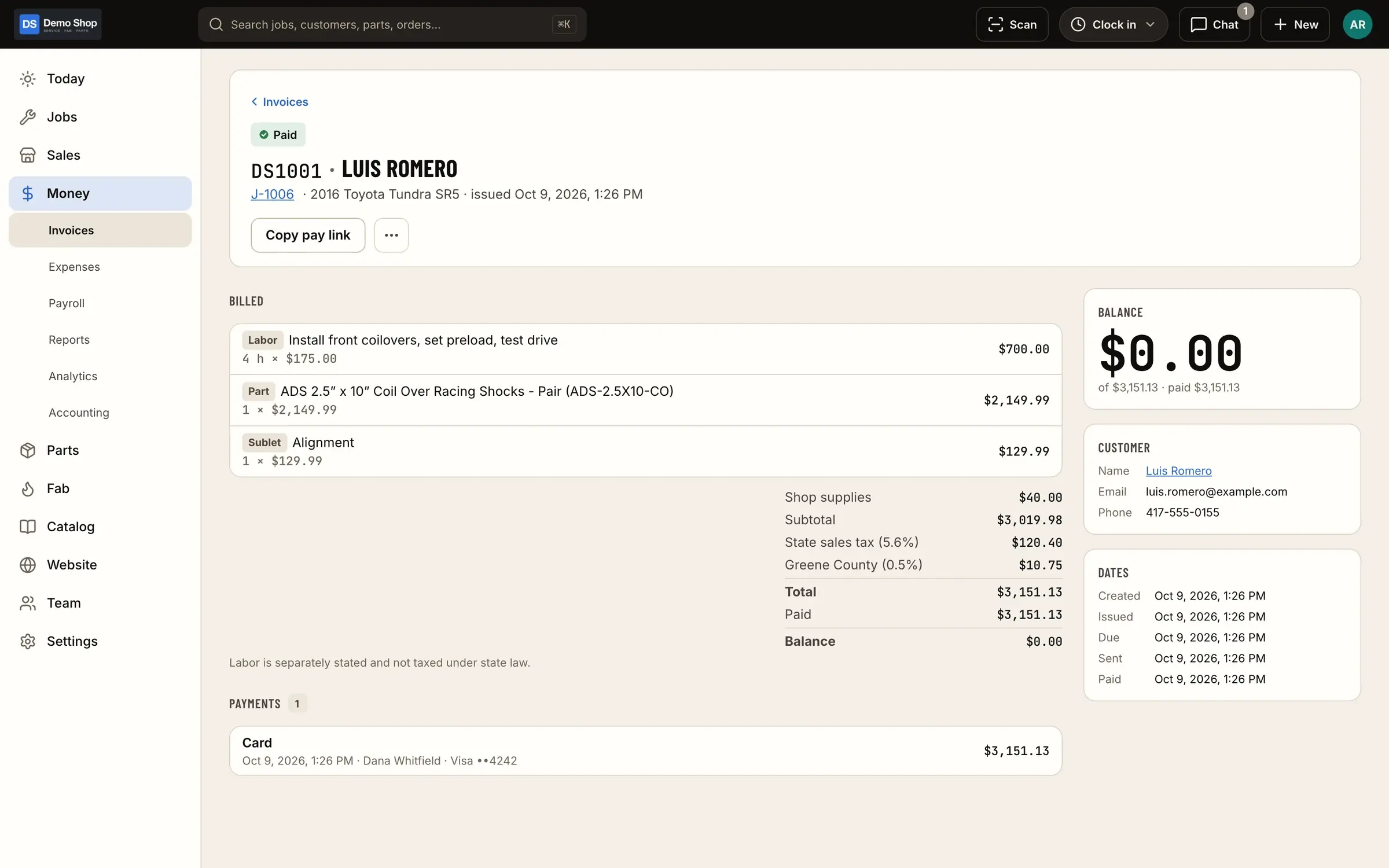
Paid orders and shop invoices go over as sales receipts, invoices and payments with the customer named, the way most bookkeepers already match sales. Or as daily summaries, if they prefer.
Accounting (QuickBooks) - 03
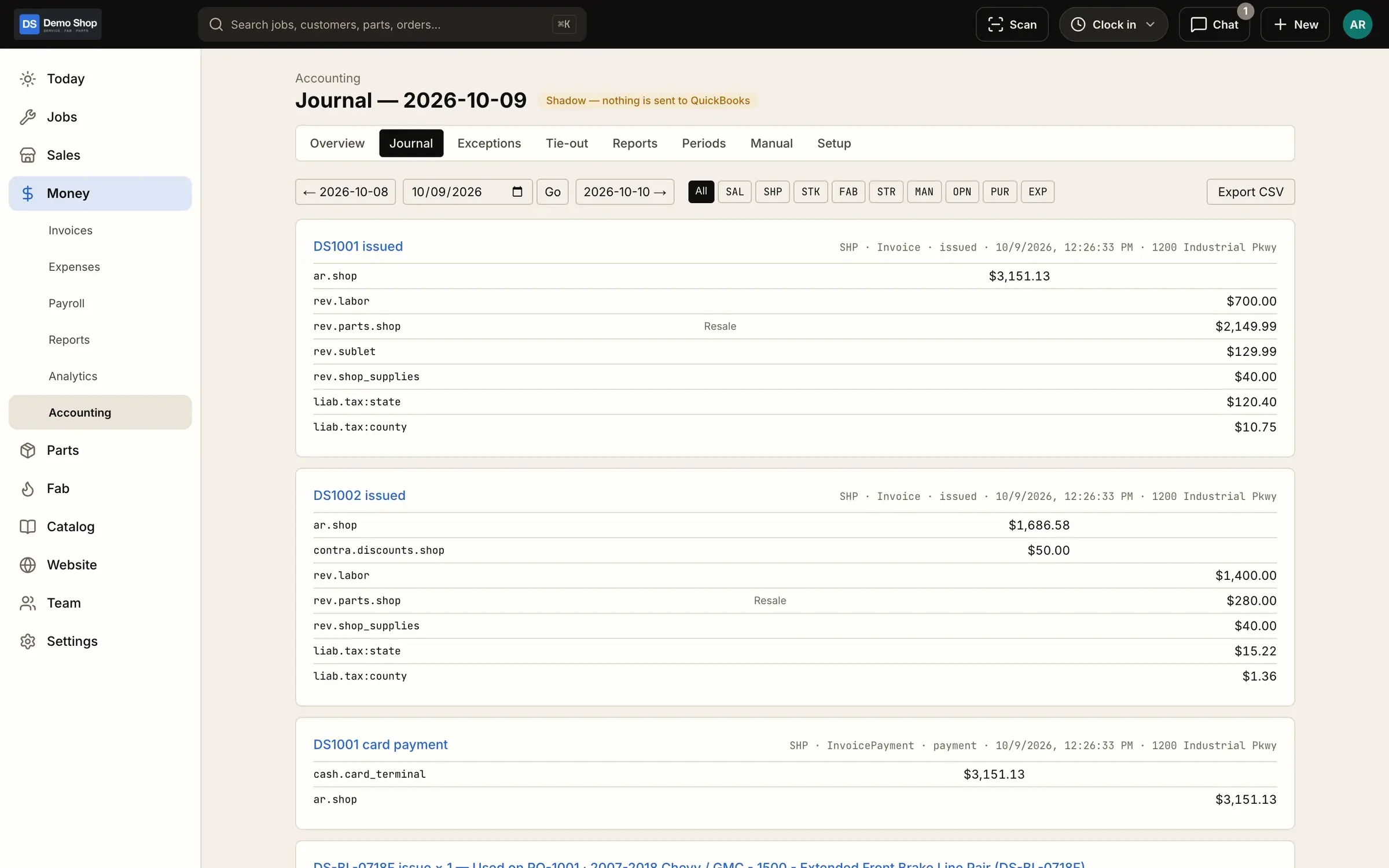
Daily summary journal entries
Inventory, cost of goods, fab work in progress and Stripe fees go as one summary entry per day and area, not hundreds of small ones.
Accounting (QuickBooks) - 04
Classes and locations
Map activity to your QuickBooks classes and locations so reports split the way you already use them.
Accounting (QuickBooks) - 05
A daily tie-out
ShopJig checks itself against QuickBooks every day, receivables included. Anything that won't post goes to a queue with the reason.
Accounting (QuickBooks) - 06
Bring your history
Import items, invoice history and estimates from QuickBooks when you start, so customers and parts are there on day one.
Imports & moving over - 07
Payroll hours ready to go
Export hours and PTO for the pay period from the same time clock that feeds job costing.
Time clock & payroll
What it looks like
Real screens from ShopJig, with a demo shop's data and a neutral demo theme.
Is it a fit?
Per-sale documents, summary entries, or both
There are two common ways shop software gets sales into QuickBooks Online.
Syncing each document. Every invoice and payment is copied into QuickBooks as its own transaction, with its customer. Your bookkeeper can open any sale in QuickBooks, but if inventory and cost of goods are synced line by line too, the books fill up with small transactions, and a failed sync or an edited invoice means tracking down the mismatch.
Posting summary journal entries. The shop system keeps the detail and posts each day’s totals to QuickBooks as journal entries. QuickBooks stays small, but there’s no customer on the sales.
ShopJig does the useful half of each. Sales (paid web orders, shop invoices, their payments and credits) go over as documents with the customer named, so your bookkeeper matches them the way they already do. Stock, cost of goods, fab work in progress and Stripe fees go as daily summary journal entries, from the costed ledger, mapped to your classes and locations. Supplier bills, vendor credits and expenses go as their own documents. Every day ShopJig ties itself out against QuickBooks, and anything that didn’t post sits in a queue with the reason. If your bookkeeper would rather have sales summarized too, that’s a setting; we’re happy to walk them through it.
What it doesn’t do
ShopJig doesn’t work with QuickBooks Desktop, doesn’t run payroll (it exports hours and PTO), and doesn’t replace QuickBooks: your general ledger, bank feeds and tax reporting stay there.
The features behind it
Accounting (QuickBooks)
Built for QuickBooks Online: a costed ledger and internal journal, sales sent with the customer on each, daily summary journal entries for stock and cost of goods, classes and locations, a daily tie-out, a sales export and Stripe Tax.
Learn moreEstimates, invoices & payments
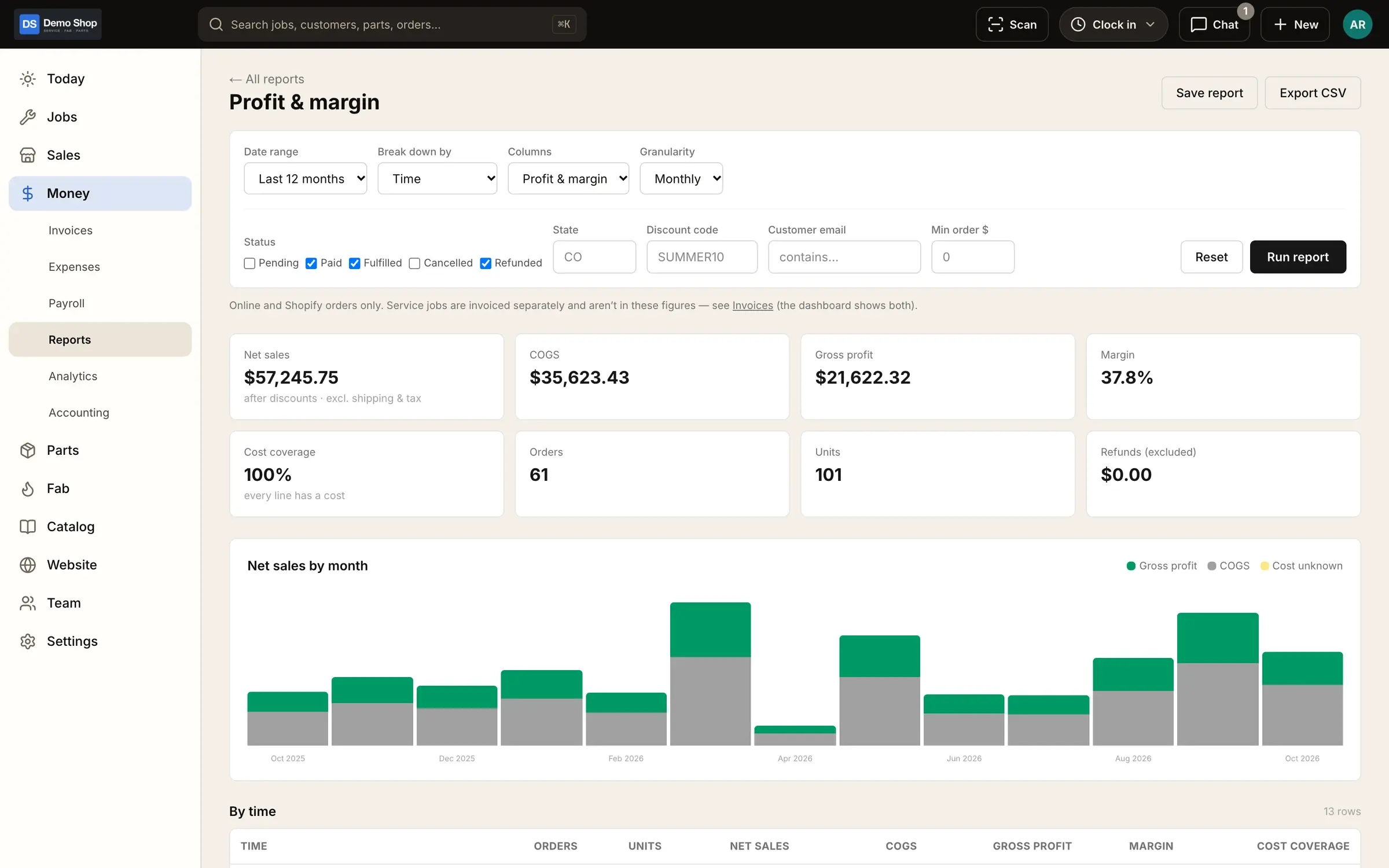
Estimates and invoices, a Stripe card reader at the counter, cash, check, Zelle and financing, pay links, a card fee on credit only, gift cards, deposits, credits, refunds with restocking fees, expenses with receipts, and reports with real margins.
Learn moreParts & inventory
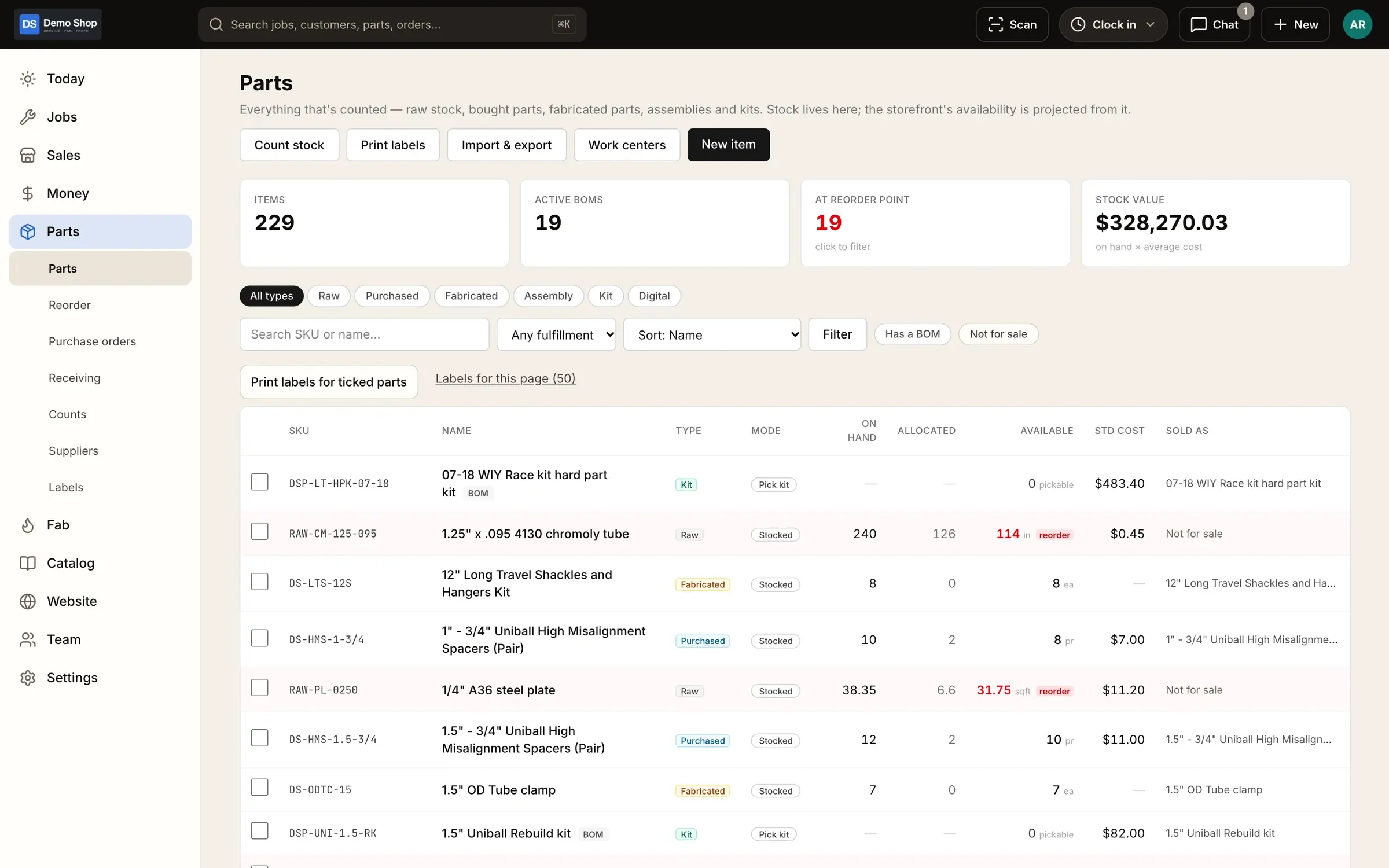
A costed stock ledger with stock by location, counts and reorder points, a "What do we need?" list, purchase orders and receiving, supplier price lists and drop ship.
Learn moreImports & moving over
Bring your catalog, customers, orders, discount codes, shipping profiles and old links over from Shopify, and items, invoice history and estimates from QuickBooks, with a switch-over that keeps the work already done.
Learn moreTime clock & payroll
Clock in for the day, log job time inside it, track shop time, handle time-change and time-off requests with approval, run a shared iPad kiosk with PINs, and export payroll with PTO.
Learn moreQuestions
Does ShopJig work with QuickBooks Desktop?
No. ShopJig is built for QuickBooks Online.
Does every invoice go to QuickBooks?
By default, yes, with its customer. Stock, cost of goods and fees go as daily summary journal entries. Your bookkeeper can switch sales to daily summaries too.
Where do I look up a single invoice?
The sale is in QuickBooks with its customer. The detail behind it (the job, the parts, the time) is in ShopJig.
Can I keep using my accountant?
Yes. Your accountant keeps working in QuickBooks Online; ShopJig keeps the shop side and sends the sales and daily entries.
Keep reading
Solutions
- Performance & build shopsLong builds on one job, custom fab work with real cost, deposits and add-on approvals, parts sold in the shop and online.
- Fabrication shopsOne-off and repeat fab work, travelers with QR codes, operation timing, real cost per part, and the invoice and books at the end.
- Machine & job shopsWork orders, travelers with QR codes, operation timing and actual vs standard cost, with purchasing, invoicing and QuickBooks Online.
Guides
Early access
Become a founding shop
We're opening ShopJig to a small group of founding shops. You get a walkthrough on your own kind of work, hands-on help getting set up, and a direct line to the people building it. Pricing isn't public yet.